
As an Amazon Associate I earn from qualifying purchases. If you buy through links in this article, we may earn a commission at no extra cost to you.
These are the 10 best motherboards for gaming in 2026, spanning AMD AM5 and AM4 plus Intel LGA1700, from compact Mini-ITX boards to full-size flagships. Choosing is tricky because chipset names hide big differences in power delivery, storage speed and networking. We shortlisted boards that cover each platform properly, checked every spec against the manufacturer, and explain the trade-offs pick by pick. New boards also land in our reviews and head-to-head comparisons.
Short on time?
Start with these three picks
One flagship all-rounder, one sensible value board and one compact specialist, so the right starting point depends on your case and your budget.

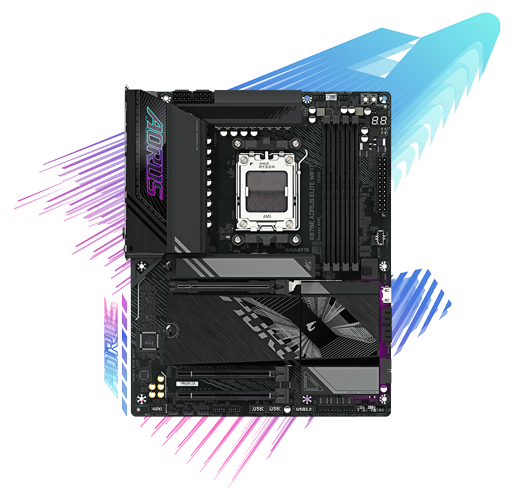
Gigabyte X870E AORUS ELITE WIFI7
The most complete AM5 package here, with three Gen5 M.2 slots, Wi-Fi 7 and dual USB4. The trade-off is lane sharing once every Gen5 slot is populated.
View on Amazon Read the full review ↓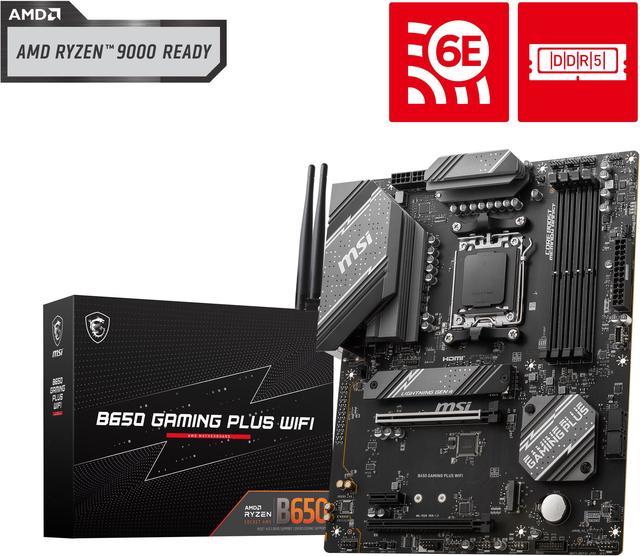
MSI B650 GAMING PLUS WIFI
Everything a Ryzen gaming build actually needs, including Wi-Fi 6E and 2.5G LAN, without paying for Gen5 features. You give up PCIe 5.0 for the GPU and SSDs.
View on Amazon Read the full review ↓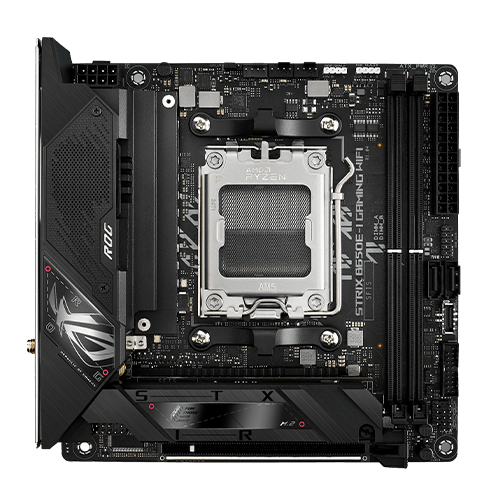
ASUS ROG STRIX B650E-I GAMING WIFI
Flagship AM5 features, PCIe 5.0 included, shrunk into Mini-ITX for small cases. Expansion is the sacrifice, with two memory slots and a single PCIe slot.
View on Amazon Read the full review ↓The shortlist
Compare all 10 at a glance
Socket and chipset decide CPU compatibility, power delivery decides stability under load, and storage plus networking decide how the finished PC feels day to day.
| Product / award | Best fit | Key decision point | Check current offer |
|---|---|---|---|
| 01. Gigabyte X870E AORUS ELITE WIFI7Best overall | A high-end Ryzen 7000 or 9000 gaming build | Gen5 storage and USB4 now; the GPU slot drops to x8 if both extra Gen5 M.2 slots are filled | View on Amazon |
| 02. MSI B650 GAMING PLUS WIFIBest value | Most Ryzen gaming builds on a sensible budget | No PCIe 5.0 anywhere; Gen4 GPU and storage only | View on Amazon |
| 03. ASUS ROG STRIX B650E-I GAMING WIFIBest compact option | Small form factor Ryzen builds | Two DIMM slots and minimal expansion in exchange for the tiny footprint | View on Amazon |
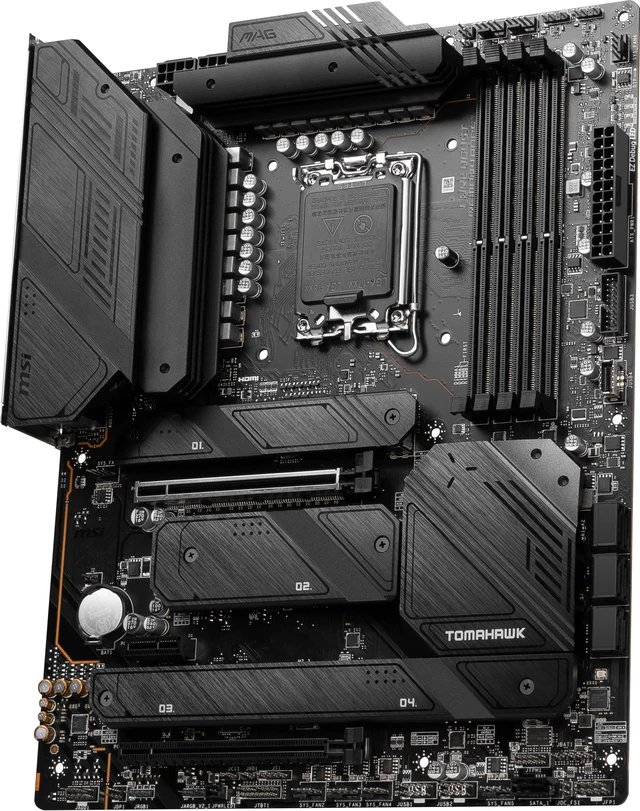
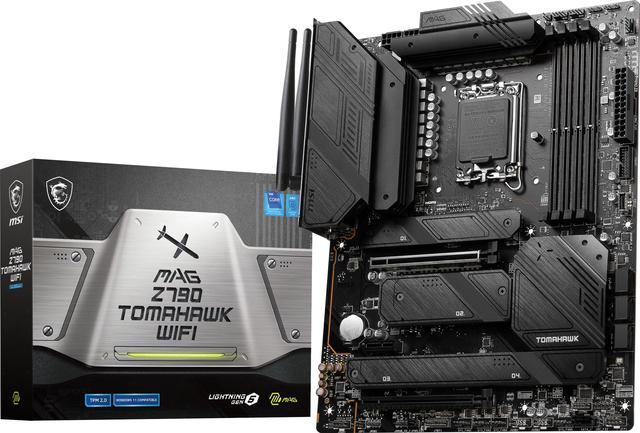 04. MSI MAG Z790 TOMAHAWK WIFIBest for connectivity 04. MSI MAG Z790 TOMAHAWK WIFIBest for connectivity | Intel builds with lots of drives and peripherals | Four Gen4 M.2 slots and seven SATA ports, but no Gen5 M.2 slot | View on Amazon |
.png) 05. ASRock X870E TAICHIBest for expansion 05. ASRock X870E TAICHIBest for expansion | Large cases and expansion-heavy rigs | E-ATX size; expansion most single-GPU builds will not use | View on Amazon |
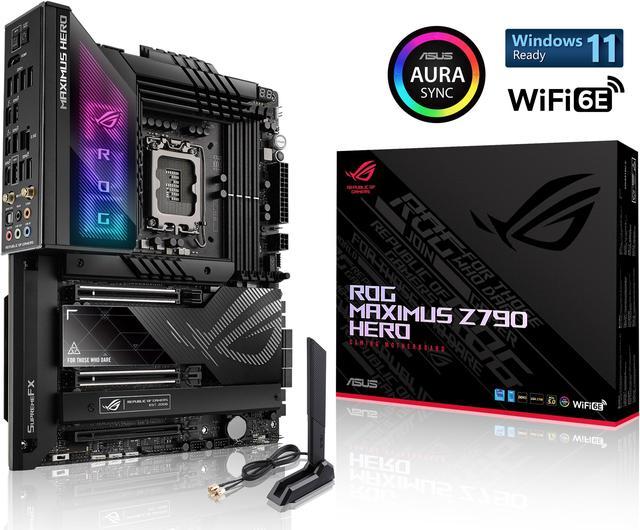 06. ASUS ROG MAXIMUS Z790 HEROBest premium option 06. ASUS ROG MAXIMUS Z790 HEROBest premium option | Flagship Intel builds and heavy tuning | Gen5 M.2 runs through the bundled Hyper M.2 card, not an onboard slot | View on Amazon |
 07. Gigabyte B650 AORUS ELITE AXBest for easy setup 07. Gigabyte B650 AORUS ELITE AXBest for easy setup | First-time AM5 builders who want easy assembly | Wi-Fi 6E rather than Wi-Fi 7; check the exact model and revision when buying | View on Amazon |
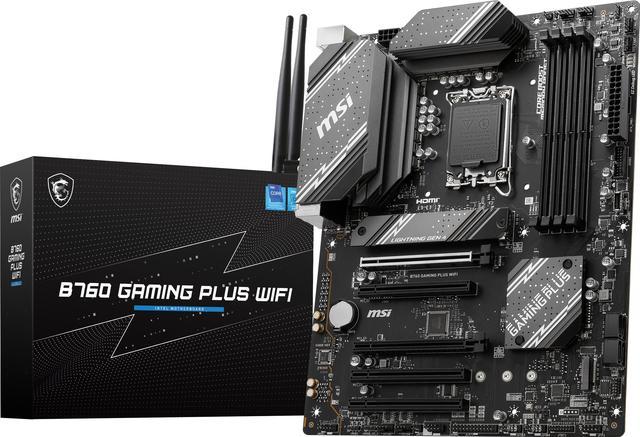 08. MSI B760 GAMING PLUS WIFIBest Intel value 08. MSI B760 GAMING PLUS WIFIBest Intel value | Intel builds around locked or mid-range Core CPUs | B760 chipset, so no CPU overclocking for K-series chips | View on Amazon |
 09. Gigabyte B550 AORUS ELITE AX V2Best AM4 upgrade 09. Gigabyte B550 AORUS ELITE AX V2Best AM4 upgrade | Upgrading or extending an AM4 Ryzen system | DDR4 platform with no path to AM5 CPUs or memory | View on Amazon |
.png) 10. ASRock B650M PRO RSBest budget option 10. ASRock B650M PRO RSBest budget option | AM5 gaming builds on the tightest budget | No onboard Wi-Fi; wired Ethernet or an add-in card required | View on Amazon |
Look closer
Our 10 picks, explained
Selections are based on manufacturer specifications, CPU support lists and feature comparisons rather than hands-on testing, and the methodology section below explains exactly how we worked.
Gigabyte X870E AORUS ELITE WIFI7
AM5 is the platform most gaming builds should start from in 2026, and this board removes the usual reasons to compromise. The 16+2+2 VRM has comfortable headroom for Ryzen 9 and X3D chips, memory support runs to DDR5-8200 with EXPO profiles, and storage is where it pulls ahead of cheaper B650 boards: three PCIe 5.0 M.2 slots plus a fourth Gen4 slot, all under heatsinks. Wi-Fi 7, Bluetooth 5.4, 2.5GbE and two USB4 ports round out connectivity that will not date quickly. The caveat is lane sharing: filling the second and third Gen5 slots drops the graphics slot to x8, which matters more for future GPUs than current ones. Against the ASRock Taichi at pick 05, you trade expansion headroom for a board that suits standard ATX builds better.
- Power design
- 16+2+2 Twin Digital VRM
- Memory
- DDR5 up to 8200 MT/s (OC), 256GB
- Storage
- 4x M.2, three at PCIe 5.0 x4
Reasons to choose it
- Three PCIe 5.0 M.2 slots for fast Gen5 SSDs
- Wi-Fi 7, dual USB4 and 2.5GbE cover modern networking
- 16+2+2 VRM runs flagship Ryzen chips with headroom
Trade-offs to know
- Filling the extra Gen5 M.2 slots drops the GPU slot to x8
- Only four SATA ports for large spinning-drive arrays
Choose this if: you are building a Ryzen 7000 or 9000 gaming PC and want Gen5 storage, Wi-Fi 7 and USB4 in a standard ATX case.
Consider another option if: your case is small or the budget is tight; the ROG STRIX B650E-I suits compact builds and the MSI B650 GAMING PLUS WIFI covers value builds.
MSI B650 GAMING PLUS WIFI
B650 remains the value sweet spot for AM5 gaming, and MSI’s Gaming Plus WiFi shows why. The 12+2+1 Duet Rail power design is comfortably matched to Ryzen 5 and Ryzen 7 chips, including the X3D models most gamers actually buy, and DDR5 support to 7200 MT/s (OC) with EXPO covers performance memory kits. Two Gen4 M.2 slots, a PCIe 4.0 x16 graphics slot, Wi-Fi 6E and 2.5G LAN tick every practical box, while the rear 20Gbps USB-C port is a genuine bonus at this level. What you give up versus the X870E at pick 01 is PCIe 5.0 entirely, plus USB4 and Wi-Fi 7. Audio is the basic ALC897 codec, so headphone users may prefer an external DAC. For a single-GPU build, nothing here holds gaming back.
- Power design
- 12+2+1 Duet Rail
- Memory
- DDR5 up to 7200+ MT/s (OC)
- Networking
- Wi-Fi 6E, 2.5G LAN
Reasons to choose it
- Wi-Fi 6E and 2.5G LAN included as standard
- 12+2+1 VRM is well matched to Ryzen 5 and 7 gaming chips
- Rear 20Gbps USB-C, rare in this class
Trade-offs to know
- No PCIe 5.0 for the GPU or SSDs
- Basic ALC897 onboard audio
Choose this if: you want AM5 gaming performance with money left for the GPU, and Gen4 storage speeds are enough.
Consider another option if: you want a Gen5 SSD slot or easier assembly; step up to the Gigabyte B650 AORUS ELITE AX.
ASUS ROG STRIX B650E-I GAMING WIFI
Mini-ITX boards often force ugly compromises, but the B650E-I keeps the features that matter for a small gaming PC. The B650E chipset brings a PCIe 5.0 x16 slot for the GPU and a Gen5 M.2 slot for storage, so a compact build loses nothing in headline speed versus full-size boards. ASUS rates the 10+2+1 power stages for demanding Ryzen chips, and practical touches like BIOS FlashBack, an M.2 Q-Latch and debug LEDs make building in a cramped case far less painful. Wi-Fi 6E, Intel 2.5G Ethernet and the ALC4080 codec are all present. The limits are physical: two DIMM slots cap memory at 96GB, there is one usable expansion slot in total, and fan and USB headers are scarce. Compare the MSI B650 at pick 02 if your case has room for ATX.
- Form factor
- Mini-ITX, AMD B650E
- GPU slot
- PCIe 5.0 x16 SafeSlot
- Storage
- M.2 Gen5 x4 + Gen4 x4
Reasons to choose it
- PCIe 5.0 GPU slot and Gen5 M.2 in a Mini-ITX board
- BIOS FlashBack and debug LEDs simplify small-case builds
- Strong ALC4080 audio and Intel 2.5G Ethernet
Trade-offs to know
- Two DIMM slots cap memory at 96GB
- Very few fan and USB headers for a compact build
Choose this if: you are building in a Mini-ITX case and refuse to give up PCIe 5.0 or Gen5 storage.
Consider another option if: you need more than two memory slots or extra expansion cards; pick a full-size board like the Gigabyte X870E AORUS ELITE WIFI7.
MSI MAG Z790 TOMAHAWK WIFI
For Intel gaming builds, the Tomahawk brief is storage and connections at a sane level of spending. Four M.2 slots, all Gen4 and all heatsinked, plus seven SATA ports mean a game library, capture drive and backups never compete for space. The 16+1+1 power design with 90A stages is more than a Core i7 needs and handles a Core i9 for gaming loads, while DDR5 support and Wi-Fi 6E keep the platform current. MSI also fits a 20Gbps USB-C port and its ALC4080-based Audio Boost 5, both rare at this tier. What is missing is a Gen5 M.2 slot and Thunderbolt, which is exactly where the ROG Hero at pick 06 justifies its premium. If your drives are Gen4 anyway, the Tomahawk is the smarter buy for most LGA1700 systems.
- Power design
- 16+1+1, 90A Smart Power Stages
- Storage
- 4x M.2 Gen4, 7x SATA
- Networking
- Wi-Fi 6E, Intel 2.5G LAN
Reasons to choose it
- Four Gen4 M.2 slots plus seven SATA ports
- 90A power stages handle Core i9 gaming loads
- ALC4080 audio and 20Gbps USB-C included
Trade-offs to know
- No PCIe 5.0 M.2 slot
- DDR5 only, so DDR4 kits cannot be reused
Choose this if: you run an Intel CPU and keep several SSDs, hard drives and peripherals attached.
Consider another option if: you want Thunderbolt 4 or Gen5 storage; the ASUS ROG MAXIMUS Z790 HERO adds both.
ASRock X870E TAICHI
The Taichi is what happens when a board is designed for expansion first and everything else second. Its 24+2+1 phase power design with 110A stages is the strongest on this list, the two PCIe 5.0 x16 slots can run x8/x8 for dual-GPU or GPU plus capture card setups, and storage stretches to four M.2 slots and six SATA ports. Networking is equally serious, with 5G LAN, Wi-Fi 7 and dual USB4, and the ESS DAC lifts onboard audio above the usual standard. The costs are literal size and focus: E-ATX rules out many mid-towers, and a single-GPU gaming PC uses a fraction of the lane budget. The X870E AORUS ELITE at pick 01 delivers the same gaming experience in a standard case. Choose the Taichi when the build will genuinely grow.
- Power design
- 24+2+1 phases, 110A SPS
- Expansion
- 2x PCIe 5.0 x16 (x16 or x8/x8)
- Networking
- 5G LAN, Wi-Fi 7, dual USB4
Reasons to choose it
- Strongest VRM on this list, 24+2+1 phases at 110A
- Two PCIe 5.0 x16 slots with x8/x8 support
- 5G LAN, Wi-Fi 7 and dual USB4
Trade-offs to know
- E-ATX size excludes many mid-tower cases
- Most single-GPU builds will not use its expansion
Choose this if: your case fits E-ATX and you plan multiple GPUs, capture cards or a large fast storage pool.
Consider another option if: you run a single GPU in a standard case; the Gigabyte X870E AORUS ELITE WIFI7 gives the same gaming result.
ASUS ROG MAXIMUS Z790 HERO
The Maximus Z790 Hero is the LGA1700 board for builders who want every box ticked and enjoy tuning. A 20+1 teamed power design with 90A stages, DDR5 support to 7800 MT/s (OC) and 192GB capacity give it the deepest overclocking headroom on the Intel side of this list. Five M.2 slots include Gen5 through the bundled ROG Hyper M.2 card, dual Thunderbolt 4 ports handle fast external storage and docks, and the SupremeFX ALC4082 codec with ESS DAC is the best onboard audio here. Q-Release slot buttons and M.2 Q-Latches make hardware swaps genuinely easier. Whether it is worth it depends on honesty about your workload: the Tomahawk at pick 04 games identically with the same CPU and GPU. Buy the Hero for connectivity, tuning and build quality, not frame rates.
- Power design
- 20+1 teamed stages, 90A
- Storage
- 5x M.2 (Gen5 via Hyper M.2 card)
- Connectivity
- Dual Thunderbolt 4, Wi-Fi 6E
Reasons to choose it
- Dual Thunderbolt 4 and five M.2 slots
- Best onboard audio here, ALC4082 with ESS DAC
- Q-Release and Q-Latch simplify hardware swaps
Trade-offs to know
- Gen5 M.2 depends on the bundled add-in card
- Premium features most gaming builds will not use
Choose this if: you want the fullest LGA1700 feature set, deep tuning controls and the best onboard audio.
Consider another option if: your priority is gaming value; the MSI MAG Z790 TOMAHAWK WIFI covers the essentials and skips the flagship extras.
Gigabyte B650 AORUS ELITE AX
Plenty of builders want AM5 without the flagship tax, and the B650 AORUS ELITE AX is the polished middle ground. On the original revision, a Twin 14+2+1 digital VRM with 70A stages runs any Ryzen gaming chip comfortably, and storage runs to three M.2 slots including one Gen5 x4, which the MSI at pick 02 cannot match. Gigabyte’s EZ-Latch fittings make GPU and SSD swaps tool-free, Q-Flash Plus updates the BIOS with no CPU fitted, and the integrated I/O shield removes a classic first-build mistake. Wi-Fi 6E and 2.5GbE cover networking. Two checks before buying: Gigabyte sells several similar AORUS ELITE variants, including a V2 with a different VRM, so confirm the exact model, and note that memory overclocking ratings vary by revision. Otherwise this is the friendliest full-size AM5 board here.
- Power design
- Twin 14+2+1 Digital VRM
- Storage
- 3x M.2 (1x Gen5, 2x Gen4)
- Networking
- Wi-Fi 6E, 2.5G LAN
Reasons to choose it
- Gen5 M.2 slot that the value MSI lacks
- EZ-Latch fittings and Q-Flash Plus ease assembly
- Wi-Fi 6E, 2.5GbE and integrated I/O shield
Trade-offs to know
- Similar AORUS ELITE variants make exact-model checks essential
- Memory overclocking ratings vary by board revision
Choose this if: you are a first-time AM5 builder who wants tool-free fittings and painless BIOS updates.
Consider another option if: you need Wi-Fi 7 or USB4 today; the Gigabyte X870E AORUS ELITE WIFI7 adds both.
MSI B760 GAMING PLUS WIFI
Not every Intel gaming PC needs an unlocked processor, and for locked or mid-range Core chips the B760 GAMING PLUS WIFI is the right-sized board. Its 12+1 Duet Rail power design is aimed squarely at Core i5 and i7 non-K parts, DDR5 support runs to 6800 MT/s (OC) for fast memory kits, and two Gen4 M.2 slots cover a boot drive and a game library. Wi-Fi 6E, Bluetooth 5.3 and 2.5G LAN come as standard, which cheaper B760 boards often cut, and the Steel Armor reinforced graphics slot suits heavy modern GPUs. The honest limitations are the chipset itself, with no CPU overclocking, and basic ALC897 audio. Pair it with a Core i5-14400F class chip and it disappears into the build, which is exactly the point at this level.
- Power design
- 12+1 Duet Rail
- Memory
- DDR5 up to 6800+ MT/s (OC)
- Storage
- 2x M.2 Gen4 x4
Reasons to choose it
- Wi-Fi 6E and Bluetooth 5.3 at a budget level
- DDR5 support to 6800 MT/s (OC)
- Reinforced Steel Armor graphics slot
Trade-offs to know
- B760 chipset blocks CPU overclocking
- Only two M.2 slots for storage expansion
Choose this if: you are pairing a locked or mid-range Intel Core CPU with DDR5 and want wireless included.
Consider another option if: you own an unlocked K-series chip and want to overclock; choose a Z790 board such as the MSI MAG Z790 TOMAHAWK WIFI.
Gigabyte B550 AORUS ELITE AX V2
AM4 earned its long life, and a Ryzen 7 5800X3D on this board still drives high-refresh gaming without replacing your CPU, memory or cooler. The 12+2 phase digital VRM with 50A DrMOS is a real step up from early B550 boards, PCIe 4.0 covers the GPU and the primary M.2 slot, and both M.2 slots wear Thermal Guards. Wi-Fi and 2.5GbE are built in, Q-Flash Plus allows BIOS updates without a CPU, and the ALC1200 audio with WIMA capacitors is a cut above budget boards. One revision caveat: early boards carry Wi-Fi 6, while later revisions move to Wi-Fi 6E, so check the listing if the 6GHz band matters to you. Just go in clear-eyed: AM4 takes no newer CPUs, and DDR4 ends here too. As an upgrade, though, it is excellent.
- Power design
- 12+2 phases, 50A DrMOS
- Memory
- DDR4 up to 4733 MT/s (OC), 128GB
- Storage
- 2x M.2 (Gen4 x4 + Gen3 x4)
Reasons to choose it
- PCIe 4.0 GPU and storage on a mature platform
- 12+2 DrMOS VRM suits Ryzen 7 5800X3D upgrades
- Q-Flash Plus updates BIOS without a CPU
Trade-offs to know
- AM4 and DDR4 have no further upgrade path
- Wi-Fi generation depends on board revision
Choose this if: you already own an AM4 CPU and DDR4 memory, or you are upgrading to a Ryzen 7 5800X3D.
Consider another option if: you are building from scratch; an AM5 board like the ASRock B650M PRO RS keeps future CPU upgrades open.
ASRock B650M PRO RS
The B650M Pro RS is the AM5 board for builders who would rather put money into the graphics card. ASRock keeps the essentials surprisingly strong: a Blazing M.2 Gen5 x4 slot for a fast boot drive, a second Gen4 slot, four DDR5 slots rated to 7200 MT/s (OC) and Dragon 2.5G LAN. The 8+2+1 DrMOS power design suits Ryzen 5 and Ryzen 7 gaming chips, which is what this board will realistically run. Cuts are made where they hurt least for a gaming PC, but they are real: there is no Wi-Fi module fitted, only an empty M.2 Key-E slot if you want to add one, audio is the basic ALC897, and Micro-ATX limits expansion cards. On wired Ethernet, none of that touches frame rates. Against the MSI B650 at pick 02, you trade wireless and ATX size for a lower-cost route onto the same platform.
- Power design
- 8+2+1 DrMOS
- Storage
- Gen5 x4 + Gen4 M.2 slots
- Networking
- 2.5G LAN, no onboard Wi-Fi
Reasons to choose it
- Gen5 M.2 slot at a budget level
- Four DDR5 slots, unusual for Micro-ATX value boards
- 2.5G LAN included as standard
Trade-offs to know
- No onboard Wi-Fi, so Ethernet or an add-in card is needed
- Basic ALC897 audio and limited expansion slots
Choose this if: you want the cheapest sensible route onto AM5 and your PC sits near a wired Ethernet connection.
Consider another option if: you need Wi-Fi out of the box; the MSI B650 GAMING PLUS WIFI includes it.
Buy with confidence
How to choose the right motherboard
Four checks that decide whether a gaming motherboard fits your build today and still makes sense after your next upgrade.
01. Confirm CPU support
Socket is only the first check. Open the manufacturer’s CPU support list for the exact board model and revision, find your processor, and note the BIOS version listed beside it. If the board ships with an older BIOS, a model with BIOS FlashBack or Q-Flash Plus lets you update it without a compatible CPU installed. Intel builders comparing 12th, 13th and 14th generation options can narrow the field with our guide to the best LGA 1700 motherboards.
02. Match your case and display
Form factor decides what fits: ATX suits most mid-towers, Micro-ATX and Mini-ITX suit smaller cases, and E-ATX boards like the Taichi at pick 05 need a wide case with the right standoff positions. Display outputs on the board only matter if your CPU has integrated graphics, so check the HDMI and DisplayPort provision on Ryzen G-series or Intel non-F builds, and ignore it entirely when a graphics card is fitted.
03. Prioritize useful connections
Count what you will actually plug in: M.2 slots and their PCIe generation for SSDs, a front-panel USB-C header that matches your case, enough fan headers for your cooling, and networking that suits your room. Wired 2.5G Ethernet is the low-latency default for gaming; Wi-Fi 6E or Wi-Fi 7 earns its place when a cable run is impractical. Premium audio codecs matter only if you drive good headphones directly from the board.
04. Budget for the whole build
Money saved on the motherboard can go straight into the graphics card, which is where gaming performance actually comes from. Spend more on a board when you need VRM headroom for a high-core-count CPU, extra M.2 slots, or connectivity you will use weekly. Treat Gen5 SSD support, USB4 and extreme memory overclocking as future-proofing rather than frame-rate features, and compare like for like: a board with Wi-Fi included can work out cheaper than a bare board plus an add-in card.
Behind the recommendations
How we selected these products
This guide is based on desk research, not hands-on testing. We started from the current AM5, LGA1700 and AM4 line-ups from Gigabyte, MSI, ASUS and ASRock, then checked every shortlisted board against its manufacturer’s specification page and CPU support list in October 2026. Boards earned their places on power delivery, storage and networking that suit gaming builds, not on benchmark claims, and each pick names its compromises so you can see what the money buys. Specifications and line-ups change, so confirm the exact model and revision before ordering.
- Compatibility: socket, chipset, memory type and CPU support were checked against each manufacturer’s published specification and support pages.
- Features and value: boards were compared on VRM design, M.2 and PCIe provision, networking and builder features at equivalent specification levels, with no prices used as a ranking input.
- Limitations: we did not independently test thermals, memory overclocking or audio quality; where a specification varies by board revision, the review says so instead of picking a number.
Common questions
Before you buy
Does the motherboard affect gaming performance?
Not directly. Frame rates are set by the CPU, graphics card and memory, so two boards running the same parts game at the same speed. What the board decides is whether the CPU can hold its boost clocks under load, how many fast SSDs you can fit, how much memory tuning headroom you get, and which connections you live with every day. Buy the board that supports your parts properly rather than chasing performance it cannot add.
How do I check whether a motherboard supports my CPU?
Go to the manufacturer’s support page for the exact board model and hardware revision, open the CPU support list, and find your processor. The list shows the BIOS version required; if the board in the box ships with an older version, choose a board with BIOS FlashBack or Q-Flash Plus so you can update it with no CPU installed. This check matters most on mature platforms like AM4 and LGA1700, where one model name spans several years of CPUs.
Which features are worth paying extra for?
Power delivery headroom if you run a high-core-count CPU, Wi-Fi if you cannot run an Ethernet cable, extra M.2 slots if your game library keeps growing, and BIOS flashback on any platform. Harder to justify for gaming alone: PCIe 5.0 SSD support before you own a Gen5 drive, extreme memory overclocking ratings, and premium audio sections if you use a USB headset or external DAC.
How do I choose between the top overall and budget picks?
Start from the parts they share: the X870E AORUS ELITE WIFI7 at pick 01 and the ASRock B650M Pro RS at pick 10 run the same Ryzen CPUs and deliver the same frame rates with the same graphics card. The flagship buys Gen5 storage across three slots, Wi-Fi 7, USB4 and stronger power delivery for future upgrades. The budget board keeps one Gen5 slot and wired networking, and drops wireless. Spend the difference on the GPU unless the flagship’s connections solve a real problem in your setup.
Choose the best fit for your build
Start with the X870E AORUS ELITE WIFI7 for a no-regrets AM5 build, or the MSI B650 GAMING PLUS WIFI if the budget matters more than Gen5 storage and USB4. Whichever you choose, verify the exact model and revision against the manufacturer’s CPU support list before ordering.
Sources and verification
Specifications and compatibility claims in this guide were checked against the following sources in October 2026. Product names and Amazon ASINs were verified from Amazon product listings found through public search results; no prices from any source are quoted in this guide.
- Gigabyte motherboard specification pages and CPU support lists
- MSI motherboard specification pages and CPU support lists
- ASUS ROG motherboard specification pages and CPU support lists
- ASRock motherboard specification pages and CPU support lists
- AMD and Intel chipset and platform documentation
- Newegg, Scan and Alza product listings, used for specification cross-checks and product imagery
- Amazon product listings, used to verify exact model names and ASINs